
Troubleshooting Common Issues
Most extraction failures can be resolved by checking a few common issues. This guide covers the most frequent problems and their solutions.
Extraction Failures
❌ Error: "PnL Tool Required for Data Extraction"
Problem: The #1 cause of extraction failure.
Causes:
- No PnL Position tool visible in screenshot
- PnL tool colors don't match requirements
- PnL tool labels are cut off or not visible
- PnL tool is too small to detect
Solutions:
- Verify PnL tool is clearly visible in your screenshot
- Check colors: RED (#f23645) for SL, GREEN (#089981 or #4caf50) for TP, BLACK (#000000) for Entry
- Ensure all three labels (Entry, SL, TP) are fully visible
- Zoom in if the PnL tool appears too small
- See full PnL Tool Guide
⚠️ Warning: "PnL Tool Labels May Be Misaligned"
Problem: Labels detected but positioning seems incorrect.
Causes:
- Entry, SL, and TP labels are more than 50px apart horizontally
- Unusual PnL tool placement or chart aspect ratio
Solutions:
- Carefully verify extracted prices against your screenshot
- Correct any incorrect values during verification
- For future uploads: Draw PnL tool with labels closer together vertically
🔴 Low Confidence Scores (Red Bars)
Problem: Extraction completed but confidence is low.
Causes:
- Poor image quality or resolution
- Low contrast (light theme, faded colors)
- Overlapping indicators or annotations
- Unusual chart configuration
Solutions:
- Use TradingView dark theme for better contrast
- Take high-quality screenshots (not phone photos)
- Remove overlapping chart elements
- Zoom in so labels are larger and clearer
- Manually correct fields during verification
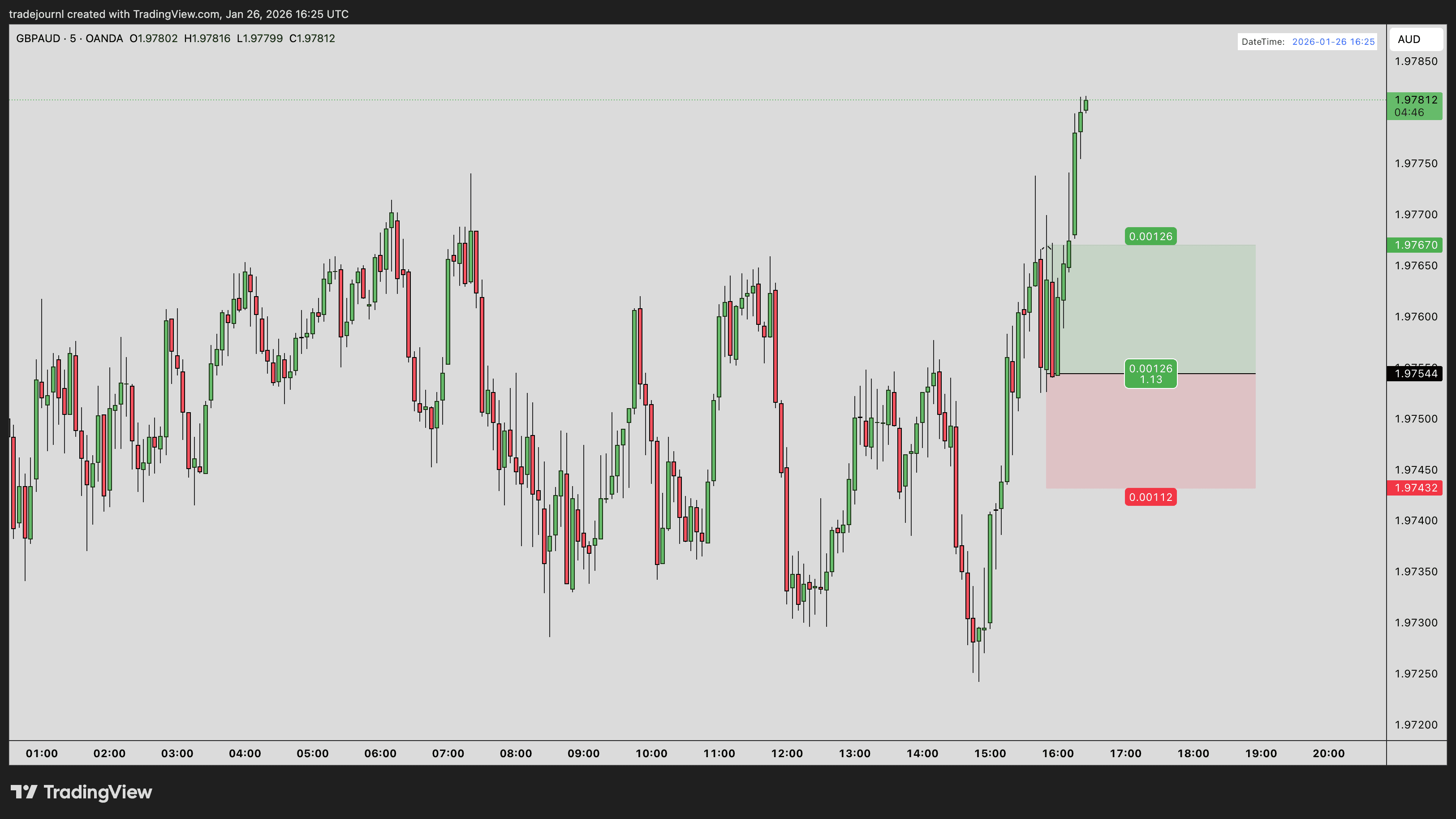
Common cause of low confidence: Candles using the same colors as PnL tool labels creates confusion for the extraction
Wrong Data Extracted
Incorrect Pair Name
Common Issues:
- Extracted as "EURUSD" instead of "EUR/USD"
- Extra characters like "EUR/USD.fx"
- Wrong pair entirely
Solutions:
- Correct to proper format during verification (EUR/USD with slash)
- Ensure pair name is clearly visible in chart title
- Use standard pair names (not custom broker symbols)
Prices Are Wrong
Common Issues:
- OCR misread a digit (1.08562 as 1.08562)
- Decimal point in wrong place
- Missing digits
Solutions:
- Always verify prices against your screenshot
- Ensure price labels are clear and unobstructed
- Use dark theme for better text clarity
- Correct manually during verification
Wrong Direction (LONG vs SHORT)
How to Verify:
- Green PnL tool pointing up = LONG
- Red PnL tool pointing down = SHORT
If wrong:
- Correct during verification
- Check if you used correct PnL tool type in TradingView
Upload Issues
File Upload Fails
Causes & Solutions:
- "File too large": Compress to under 10MB or use JPEG
- "Invalid file type": Only PNG and JPEG supported
- Upload hangs: Check internet connection, try fewer files at once
- Browser error: Clear cache, try incognito mode, or different browser
Monthly Limit Reached
Error: "Upload limit exceeded for current tier"
Solutions:
- Wait until next month (limits reset on 1st)
- Upgrade to higher tier for more uploads
- Prioritize most important trades
Processing Issues
Processing Takes Too Long
Normal times: 5-10 seconds per screenshot
If stuck >60 seconds:
- Check browser console for errors (F12)
- Refresh the page and try again
- Try uploading one screenshot at a time
- Contact support if issue persists
Processing Fails Silently
Symptoms: Stuck on "Processing" with no progress
Solutions:
- Open browser developer console (F12) to see errors
- Check if ad blocker is interfering
- Disable browser extensions temporarily
- Try different browser
DateTime & Optional Features
DateTime Not Detected
Not critical - you can manually enter date/time.
To fix for future uploads:
- Add DateTime indicator to chart
- Position in top-left or top-right corner
- Ensure text is clearly visible
- See DateTime Guide
Text Annotations Not Extracted
Possible causes:
- Text too small to read
- Poor contrast with background
- Unusual font or styling
Solutions:
- Increase text size in TradingView
- Use contrasting colors
- Add notes manually during verification
Auto-Grouping Issues
Screenshots Not Grouping Correctly
Problem: Multiple timeframes of same trade not grouped together
Causes:
- Pair names slightly different (EUR/USD vs EURUSD)
- Direction mismatch
- One screenshot has wrong data
Solutions:
- Manually merge during grouping stage
- Ensure consistent pair naming across screenshots
- Verify direction is correct on all screenshots
Different Trades Grouped Together
Problem: Separate trades incorrectly grouped
Solutions:
- Manually split during grouping stage
- Use different pairs or directions to force separation
Account & Authentication Issues
Can't Log In
- Check email and password are correct
- Try "Forgot Password" to reset
- Clear browser cookies and try again
- Try Google OAuth if you used that originally
Session Expired
- Normal after 30 days of inactivity
- Simply log in again
- Any in-progress uploads may be lost
Getting More Help
If your issue isn't covered here:
- Check other help articles: Help Center
- Email support: support@tradejour.nl
- Include:
- Description of the problem
- Screenshot that failed (if applicable)
- Browser and OS version
- Any error messages
Related Guides
Last updated: January 2026